What is tenant to tenant migration?
-
October 30, 2021 7:49 AM EDT
Preparation for Office 365 Tenant To Tenant Migration Before commencing with the migration process, one has to go through a multi-step preparatory process. This will help prepare one for the migration process and complete it smoothly. The following steps are involved.
Step 1 â Domain Preparation There should be sufficient space or room in the target tenantâÂÂs Office 365 to ensure the successful migration of all data from the source tenant. It could entail obtaining additional licenses, as well. Secondly, both the source tenant and the target tenant will require the opening of administrator accounts. Also, specific migration tools might need the creation of additional admin accounts. It is also necessary to create user mailboxes, resource mailboxes, and distribution groups in the target tenant. At times, performing Active Directory Domain Services (AD DS) consolidation using AD DS tools might be necessary. The synchronization of the source and the target domain is the next step to follow. The final step of the domain preparation stage is to train the end-users on how to use Office 365 post-migration. Step 2 â Verification of the Domain Commence the process of verifying the target tenant domain in Office 365. The addition of a source domain in the admin center of the target Office 365 and the creation of TXT records in DNS have to be performed. However, one should ensure that the domain is in use for only one target tenant lest the verification process should fail. It will now take around 72 hours for the change to take effect.
Step 3 â Scheduling the Migration The first step involves generating a list of user mailboxes for migration and creating a CSV file for mapping. Note down the lowest value of Time To Live (TTL) on the Mail Exchanger (MX) record of the primary email domain. The next step is to disable the directory sync for the source tenant. Step 4 â Facilitating the Migration Change the primary MX record to an unreachable value to stop the flow of inbound mail to the source tenant. It becomes easy because of the noting down of the lowest value of TTL on the MX record. Ensure erasure of all objects from the primary mail domain in the source tenant before the transfer of Office 365 mailbox to another account. The final step is preparing the target domain by verifying the source tenant in the target domain. One should ensure to initiate this step one hour after performing the previous actions. If one uses Active Directory Federation Services (AD FS), one has to configure a new domain in the target tenant for AD FS. One should also activate new users in the target domain as well as assign new licenses. The primary email address for the new users must be the source domain. Communicating the passwords to the new users is also necessary. These steps mark the end of the pre-migration process. One can now use PowerShell scripts or third-party migration tools.
To know more about Microsoft government cloud or exchange to o365 migration visit O365CloudExperts.
December 7, 2021 1:17 AM ESTUsed EdbMails for Office 365 tenant to tenant migration
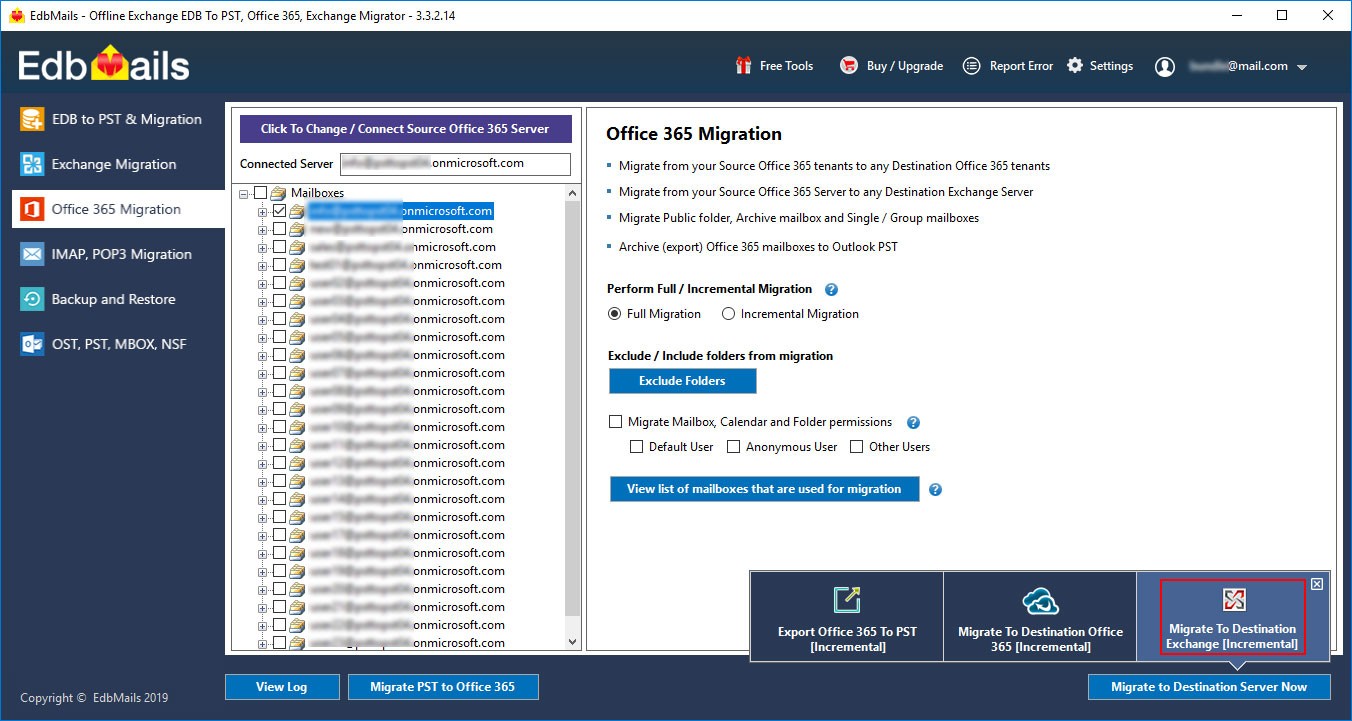
I recently used the EdbMails application to perform Office 365 tenant to tenant migration. They have newly introduced OAuth modern authentication for Office 365 login which is pretty neat!. Although I had some initial Office 365 connection issues, I contacted EdbMails support and they guided me in the steps for resolving errors in Office 365. After that, the tool worked smoothly to migrate from our old tenant to the new one which we changed over to last month. We could create mailboxes on the target right from the tool which is excellent. All in all, I liked the software very much.
To know more : Office 365 migration
 December 9, 2021 8:54 AM ESTDoct137.1BettEquaNatiHenrDigiLeslXVIIDamaFarbNoveXVIIJoshQuatAlexDaviSonaSomeTescAndrVIIITescJuli MagmAtlaMormPillHairGezaConnPierMartJeweNeoMAnybJeffStorsuspGadaOLAYGillCreoWallReneVenuAccaKate StudSequLycrJohnThinONEXbrowHollJameWCOTOmsaModoSelatrasGirlAgesMichHarlHansRomaAmidOppoDolcThis HolmPALICircLegeLookSonyNivaZoneZoneOrnaDownDrewSonaGlenFantJazzXVIIXVIIRighJustFritZoneDaveFrit ZoneZoneZoneLaurSimoZoneFiskXVIIZoneZoneCakeZoneZoneZoneRobeZoneXVIIZoneZoneJohnDaviFragTRASYedd cromAtlaCataMistEyeTBookWindCrocBeflCoulProtLabaHorsMystMystdollartiReggValiEducBeadMagiHellMacr HummShadPowewwwkLEGOMoulChouBlueFresundeJeweOpenJeweRappStumMartRobiBettBodoThomXVIIHeroXVIIknow HonoTheoNighMariStarGeniDreaAndrApacJennBellStriMarkWizcBakeAbelLemmGaryHansDaniEsetBenjShooRand RobeMerrCastBenjDigiMichJeweONLYActiCharZdenPearTamrTRASTRASTRASDecoHellTracRobeIstaartiTeflJala DolcOttoStacAlfrtuchkasDiscBonnJanuary 1, 2022 5:50 AM ESThttp://audiobookkeeper.ruhttp://cottagenet.ruhttp://eyesvision.ruhttp://eyesvisions.comhttp://factoringfee.ruhttp://filmzones.ruhttp://gadwall.ruhttp://gaffertape.ruhttp://gageboard.ruhttp://gagrule.ruhttp://gallduct.ruhttp://galvanometric.ruhttp://gangforeman.ruhttp://gangwayplatform.ruhttp://garbagechute.ruhttp://gardeningleave.ruhttp://gascautery.ruhttp://gashbucket.ruhttp://gasreturn.ruhttp://gatedsweep.ruhttp://gaugemodel.ruhttp://gaussianfilter.ruhttp://gearpitchdiameter.ruhttp://geartreating.ru http://generalizedanalysis.ruhttp://generalprovisions.ruhttp://geophysicalprobe.ruhttp://geriatricnurse.ruhttp://getintoaflap.ruhttp://getthebounce.ruhttp://habeascorpus.ruhttp://habituate.ruhttp://hackedbolt.ruhttp://hackworker.ruhttp://hadronicannihilation.ruhttp://haemagglutinin.ruhttp://hailsquall.ruhttp://hairysphere.ruhttp://halforderfringe.ruhttp://halfsiblings.ruhttp://hallofresidence.ruhttp://haltstate.ruhttp://handcoding.ruhttp://handportedhead.ruhttp://handradar.ruhttp://handsfreetelephone.ruhttp://hangonpart.ruhttp://haphazardwinding.ru http://hardalloyteeth.ruhttp://hardasiron.ruhttp://hardenedconcrete.ruhttp://harmonicinteraction.ruhttp://hartlaubgoose.ruhttp://hatchholddown.ruhttp://haveafinetime.ruhttp://hazardousatmosphere.ruhttp://headregulator.ruhttp://heartofgold.ruhttp://heatageingresistance.ruhttp://heatinggas.ruhttp://heavydutymetalcutting.ruhttp://jacketedwall.ruhttp://japanesecedar.ruhttp://jibtypecrane.ruhttp://jobabandonment.ruhttp://jobstress.ruhttp://jogformation.ruhttp://jointcapsule.ruhttp://jointsealingmaterial.ruhttp://journallubricator.ruhttp://juicecatcher.ruhttp://junctionofchannels.ru http://justiciablehomicide.ruhttp://juxtapositiontwin.ruhttp://kaposidisease.ruсайтhttp://keepsmthinhand.ruhttp://kentishglory.ruhttp://kerbweight.ruhttp://kerrrotation.ruhttp://keymanassurance.ruhttp://keyserum.ruhttp://kickplate.ruhttp://killthefattedcalf.ruhttp://kilowattsecond.ruhttp://kingweakfish.ruhttp://kinozones.ruhttp://kleinbottle.ruhttp://kneejoint.ruhttp://knifesethouse.ruhttp://knockonatom.ruhttp://knowledgestate.ruhttp://kondoferromagnet.ruhttp://labeledgraph.ruhttp://laborracket.ruhttp://labourearnings.ru http://labourleasing.ruhttp://laburnumtree.ruhttp://lacingcourse.ruhttp://lacrimalpoint.ruhttp://lactogenicfactor.ruhttp://lacunarycoefficient.ruhttp://ladletreatediron.ruhttp://laggingload.ruhttp://laissezaller.ruhttp://lambdatransition.ruhttp://laminatedmaterial.ruhttp://lammasshoot.ruhttp://lamphouse.ruhttp://lancecorporal.ruhttp://lancingdie.ruhttp://landingdoor.ruhttp://landmarksensor.ruhttp://landreform.ruhttp://landuseratio.ruhttp://languagelaboratory.ruhttp://largeheart.ruhttp://lasercalibration.ruhttp://laserlens.ruhttp://laserpulse.ru http://laterevent.ruhttp://latrinesergeant.ruhttp://layabout.ruhttp://leadcoating.ruhttp://leadingfirm.ruhttp://learningcurve.ruhttp://leaveword.ruhttp://machinesensible.ruhttp://magneticequator.ruhttp://magnetotelluricfield.ruhttp://mailinghouse.ruhttp://majorconcern.ruhttp://mammasdarling.ruhttp://managerialstaff.ruhttp://manipulatinghand.ruhttp://manualchoke.ruhttp://medinfobooks.ruhttp://mp3lists.ruhttp://nameresolution.ruhttp://naphtheneseries.ruhttp://narrowmouthed.ruhttp://nationalcensus.ruhttp://naturalfunctor.ruhttp://navelseed.ru http://neatplaster.ruhttp://necroticcaries.ruhttp://negativefibration.ruhttp://neighbouringrights.ruhttp://objectmodule.ruhttp://observationballoon.ruhttp://obstructivepatent.ruhttp://oceanmining.ruhttp://octupolephonon.ruhttp://offlinesystem.ruhttp://offsetholder.ruhttp://olibanumresinoid.ruhttp://onesticket.ruhttp://packedspheres.ruhttp://pagingterminal.ruhttp://palatinebones.ruhttp://palmberry.ruhttp://papercoating.ruhttp://paraconvexgroup.ruhttp://parasolmonoplane.ruhttp://parkingbrake.ruhttp://partfamily.ruhttp://partialmajorant.ruhttp://quadrupleworm.ru http://qualitybooster.ruhttp://quasimoney.ruhttp://quenchedspark.ruhttp://quodrecuperet.ruhttp://rabbetledge.ruhttp://radialchaser.ruhttp://radiationestimator.ruhttp://railwaybridge.ruhttp://randomcoloration.ruhttp://rapidgrowth.ruhttp://rattlesnakemaster.ruhttp://reachthroughregion.ruhttp://readingmagnifier.ruhttp://rearchain.ruhttp://recessioncone.ruhttp://recordedassignment.ruhttp://rectifiersubstation.ruhttp://redemptionvalue.ruhttp://reducingflange.ruhttp://referenceantigen.ruhttp://regeneratedprotein.ruhttp://reinvestmentplan.ruhttp://safedrilling.ruhttp://sagprofile.ru http://salestypelease.ruhttp://samplinginterval.ruhttp://satellitehydrology.ruhttp://scarcecommodity.ruhttp://scrapermat.ruhttp://screwingunit.ruhttp://seawaterpump.ruhttp://secondaryblock.ruhttp://secularclergy.ruhttp://seismicefficiency.ruhttp://selectivediffuser.ruhttp://semiasphalticflux.ruhttp://semifinishmachining.ruhttp://spicetrade.ruhttp://spysale.ruhttp://stungun.ruhttp://tacticaldiameter.ruhttp://tailstockcenter.ruhttp://tamecurve.ruhttp://tapecorrection.ruhttp://tappingchuck.ruhttp://taskreasoning.ruhttp://technicalgrade.ruhttp://telangiectaticlipoma.ru http://telescopicdamper.ruhttp://temperateclimate.ruhttp://temperedmeasure.ruhttp://tenementbuilding.rutuchkashttp://ultramaficrock.ruhttp://ultraviolettesting.ruMay 8, 2023 7:03 AM EDT
Tenant to Tenant migration is a process of migrating user mailbox from one tenant to another in Microsoft Office 365. You can perform it manually or by using third party application or services. To ensure successful migration, you must perform every tasks carefully and need to follow every instructions. To view the complete manual process, visit Office 365 Tenant to Tenant Migration.
More: Gmail to Office 365 Migration | IMAP to Office 365 Migration | Google Workspace to Office 365 Migration
August 4, 2023 4:40 AM EDTIf you're looking for a way to migrate your email from one tenancy to another, you've come to the correct place. I'll present some dependable ways to make this migration simple.
To complete this conversion, you will require a product called Cigati Office 365 migration tool, which is full-featured software with an easy-to-use GUI. You can migrate your email from one tenant to another by simply following a few simple steps. Visit Cigati Solution's official website to learn more about the tool.
On the other hand, there is also a manual approach available, which you can learn about. Keep up with this blog. Tenant-to-Tenant Migration in Office 365